Advanced Topics
This guide covers advanced features of XenoAtom.CommandLine: the parse API for testing, shell completions, response files, configuration, and performance.
Parse API
CommandApp.Parse(...) runs the full parsing pipeline — option callbacks, argument binding, constraint checks — but does not invoke the command action. This is ideal for unit testing:
string? name = null;
int port = 0;

var app = new CommandApp("myexe")
{
    { "n|name=", "Your {NAME}", v => name = v },
    { "p|port=", "Server {PORT}", (int v) => port = v },
    new HelpOption(),
    (ctx, _) => ValueTask.FromResult(0)
};

var result = app.Parse(["--name", "Alice", "--port", "8080"]);

// result.HasErrors          → false
// result.ResolvedCommandPath → "myexe"
// result.OptionValues["name"][0] → "Alice"
// result.OptionValues["port"][0] → "8080"
// name → "Alice" (option callbacks are invoked)
// port → 8080
ParseResult Properties
| Property | Type | Description |
|---|---|---|
ResolvedCommand |
Command |
The command that was resolved |
ResolvedCommandPath |
string |
Full command path (e.g. "myexe commit") |
OptionValues |
IReadOnlyDictionary<string, IReadOnlyList<string?>> |
Parsed option values by name |
ArgumentValues |
IReadOnlyList<string> |
Parsed positional argument values |
RemainingArguments |
IReadOnlyList<string> |
Remaining unbound arguments |
Errors |
IReadOnlyList<CommandException> |
Parse errors (empty on success) |
HasErrors |
bool |
Whether any errors occurred |
HelpRequested |
bool |
Whether --help was passed |
VersionRequested |
bool |
Whether --version was passed |
Parse Behavior
- Option and argument action callbacks are invoked during parsing.
- The command action is not invoked.
- Help/version requests are surfaced via
HelpRequested/VersionRequested. - Errors are collected in
Errorsinstead of being written to stderr. - If
runConfigis null,OutandErrordefault toTextWriter.Nullto suppress output. - Parsing mutates per-run option state (
WasSettracking), so command graphs are intended for one invocation at a time.
Invocation Concurrency Contract
- Command graphs are not thread-safe for concurrent
RunAsync/Parsecalls on the same command tree. - Sequential invocations on the same graph are supported.
- Create separate command graph instances if you need true parallel invocations.
Testing Sub-Commands
var result = app.Parse(["commit", "--message", "Hello"]);

// result.ResolvedCommandPath → "myexe commit"
// result.OptionValues["message"][0] → "Hello"
Shell Completions
XenoAtom.CommandLine can generate shell completion scripts and provide completion candidates for partially typed command lines.
Adding Completion Support
Add CompletionCommands to your app to expose completion commands:
var app = new CommandApp("myexe")
{
    new CompletionCommands(),
    { "n|name=", "Your {NAME}", v => {} },
    new HelpOption(),
    new Command("build", "Build the project") { (ctx, _) => ValueTask.FromResult(0) },
    (ctx, _) => ValueTask.FromResult(0)
};
This adds two sub-commands:
completion <shell>(hidden) — generates the shell completion script__complete(hidden) — handles completion requests from the shell
Both commands are hidden from default help output, but callable directly.
Installing Completions
Generate and source the completion script for your shell:
# Bash (current session)
eval "$(myexe completion bash)"

# Zsh (current session)
source <(myexe completion zsh)

# Fish (current session)
myexe completion fish | source

# PowerShell (current session)
myexe completion powershell | Out-String | Invoke-Expression
Programmatic Completions
You can also get completion candidates programmatically:
var candidates = app.GetCompletions("myexe --na");
// → ["--name"]

var commandCandidates = app.GetCompletionsForTokens(["myexe", "buil"], tokenIndex: 1);
// → ["build"]
Value Completions
Provide completion candidates for option and argument values:
app.Options["name"].ValueCompleter = static (index, prefix) =>
    ["Alice", "Bob", "Charlie"];

app.Arguments[0].ValueCompleter = static (index, prefix) =>
    ["README.md", "src/", "tests/"];
The ValueCompleter delegate receives:
index— the 0-based value index being completedprefix— the partially typed text
Completion Protocol
The shell scripts call the hidden __complete sub-command using one of two modes:
- Token mode (preferred):
myexe __complete --command-name <NAME> --index <N> --token <T1> --token <T2> ... - Line mode (fallback):
myexe __complete --command-name <NAME> --line <LINE> --cursor <POS>
Completion is non-executing — it does not invoke user option actions. It only inspects the declared command tree.
Response Files
Response files let users put arguments in a file and reference it with @:
Enabling Response Files
Add ResponseFileSource to your command:
var app = new CommandApp("myexe")
{
    new HelpOption(),
    new ResponseFileSource(),
    { "<>", "Extra arguments" },
    (ctx, arguments) =>
    {
        foreach (var arg in arguments)
            ctx.Out.WriteLine(arg);
        return ValueTask.FromResult(0);
    }
};
Help output includes:
@file Read response file for more options.
Using Response Files
Create a response file (e.g. args.txt):
--name John
--port 8080
# This is a comment
"hello world"
Pass it with @:
myexe @args.txt
Response File Syntax
| Feature | Syntax | Example |
|---|---|---|
| Whitespace separation | spaces/tabs | --name John → --name, John |
| Quoted values | "..." or '...' |
"hello world" → hello world |
| Comments | # at start of line |
# This is a comment |
| Escaping (non-Windows) | \ |
c\ d → c d |
| Literal backslash (Windows) | \ is literal |
C:\Temp\file.txt → C:\Temp\file.txt |
Custom Argument Sources
You can create your own argument source by extending ArgumentSource:
public class EnvironmentSource : ArgumentSource
{
    public override string Description => "Read arguments from environment";
    public override string[] GetNames() => ["@env"];
    public override bool TryGetArguments(string value, out IEnumerable<string>? arguments)
    {
        if (value.StartsWith("@env:"))
        {
            var envValue = Environment.GetEnvironmentVariable(value[5..]);
            arguments = envValue?.Split(' ') ?? [];
            return true;
        }
        arguments = null;
        return false;
    }
}
Configuration
CommandConfig
CommandConfig controls application-level behavior. It is set once when creating the CommandApp:
var config = new CommandConfig
{
    StrictOptionParsing = true,                    // default
    Localizer = s => s,                            // identity by default
    EnvironmentVariableResolver = Environment.GetEnvironmentVariable,  // default
    OutputFactory = runConfig => new MyOutputRenderer(),
};

var app = new CommandApp("myexe", config: config);
| Property | Default | Description |
|---|---|---|
StrictOptionParsing |
true |
Fail on unknown -/-- tokens |
Localizer |
Identity | Transform all built-in strings (for localization) |
EnvironmentVariableResolver |
Environment.GetEnvironmentVariable |
Customize env-var lookup |
OutputFactory |
null (uses DefaultCommandOutput) |
Factory for custom output rendering |
CommandRunConfig
CommandRunConfig controls runtime behavior for a specific invocation:
var runConfig = new CommandRunConfig(Width: 120, OptionWidth: 32)
{
    Out = Console.Out,
    Error = Console.Error,
    ShowLicenseOnRun = true,
};

await app.RunAsync(args, runConfig);
| Property | Default | Description |
|---|---|---|
Width |
80 |
Terminal width for formatting |
OptionWidth |
29 |
Column width for option names in help |
Out |
Console.Out |
Standard output writer |
Error |
Console.Error |
Standard error writer |
ShowLicenseOnRun |
true |
Whether to print the license header |
Localization
Use CommandConfig.Localizer to translate all built-in strings:
var app = new CommandApp("myexe", config: new CommandConfig
{
    Localizer = text => MyLocalizationService.Translate(text),
});
The localizer is applied before strings are written to Out/Error.
Environment Variable Resolution
Override environment variable lookup for testing or custom scenarios:
var envVars = new Dictionary<string, string> { ["MY_PORT"] = "8080" };

var app = new CommandApp("myexe", config: new CommandConfig
{
    EnvironmentVariableResolver = name => envVars.GetValueOrDefault(name),
});
EnumWrapper
EnumWrapper<T> provides AOT-friendly enum parsing for options:
var colors = new List<Color>();

var app = new CommandApp("myexe")
{
    { "c|color=", "Console {COLOR} (" + EnumWrapper<Color>.Names + ")",
        (EnumWrapper<Color> v) => colors.Add(v) },
    (ctx, _) => ValueTask.FromResult(0)
};

enum Color { Red, Green, Blue }
EnumWrapper<T>:
- Implements
ISpanParsable<T>for seamless integration with the option parser. - Provides case-insensitive parsing.
- Has a static
Namesproperty returning a comma-separated list of valid values. - Supports implicit conversion to and from the wrapped enum type.
Performance
The parser is optimized for minimal allocations:
- No regex usage during parsing
- No per-option
string.Splitarrays - Optimized hot paths for option lookup and value extraction
Benchmarking
Run the included benchmarks:
dotnet run -c Release --project src/XenoAtom.CommandLine.Benchmarks
NativeAOT Compatibility
XenoAtom.CommandLine is fully compatible with NativeAOT publishing:
- No runtime code generation, dynamic proxies, or runtime binding
- All types are trimmer-safe
EnumWrapper<T>avoids runtime reflection for enum parsing- Built-in defaults use only lightweight assembly metadata lookups (for example command name/version discovery)
Publish with NativeAOT:
dotnet publish -c Release -r win-x64 /p:PublishAot=true
Class Diagram
The following diagram shows the main types and their relationships:
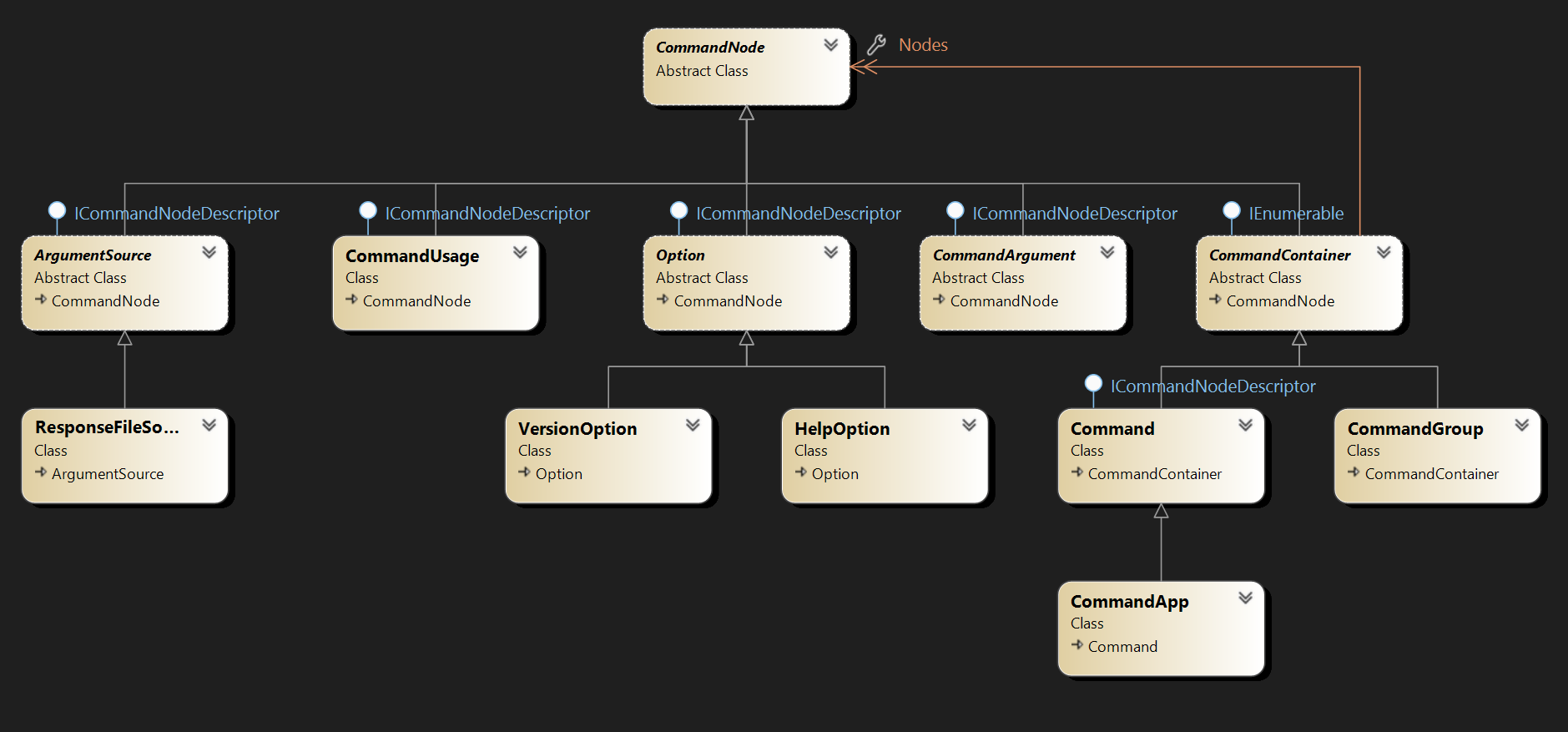
The design is intentionally simple. The main types are:
CommandApp— entry point, inherits fromCommandCommand— executable command with options, arguments, and sub-commandsCommandGroup— conditional group of nodesOption— option with prototype, description, and callbackCommandArgument— positional argument with cardinalityHelpOption/VersionOption— built-in optionsResponseFileSource—@fileargument expansionCompletionCommands— shell completion supportCommandUsage— usage text for help
All these types inherit from CommandNode, the base class for all command tree nodes. Container types (Command, CommandApp, CommandGroup) inherit from CommandContainer and support collection initializers.
Next Steps
- Getting Started — first application walkthrough
- Options — full option reference
- Commands — sub-commands and groups
- Arguments — positional arguments
- Validation & Constraints — validate values and constraints
- Help & Output — customize help rendering