Canvas
Canvas is an immediate-mode drawing surface for cell-based terminal graphics.
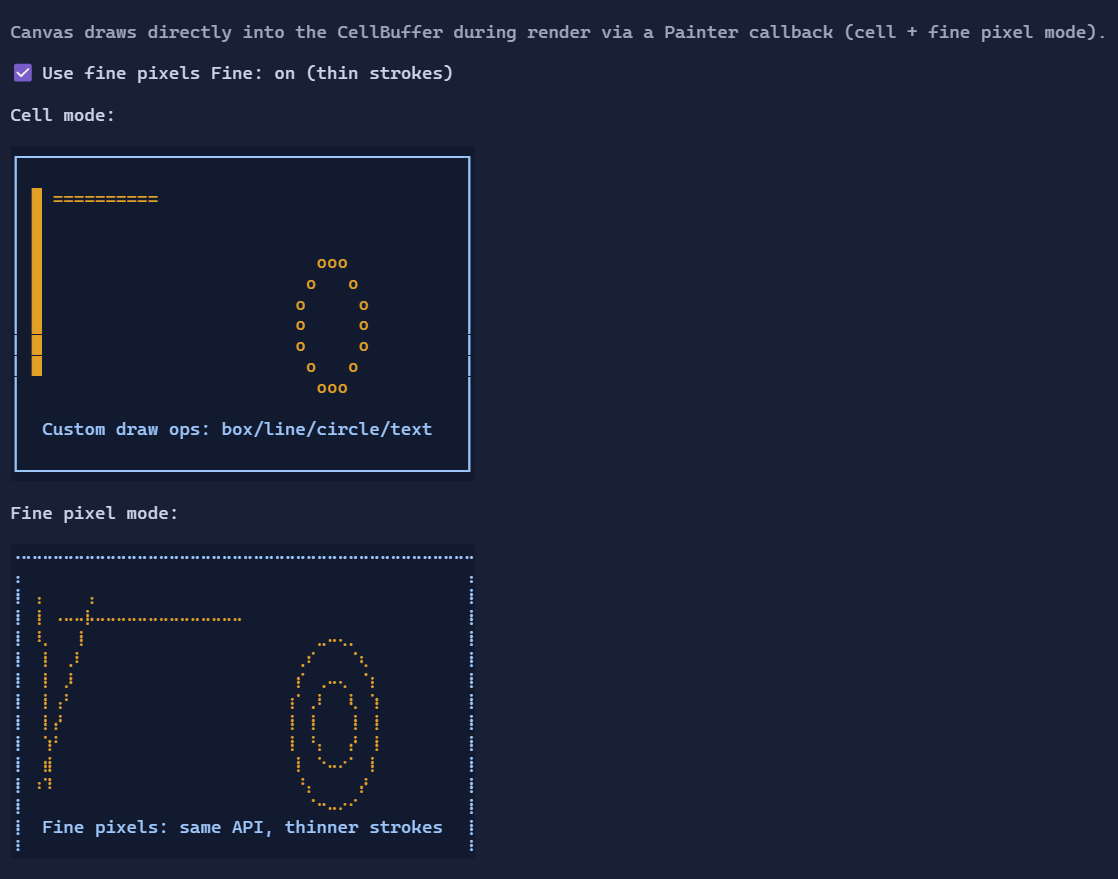
Basic usage
Provide a Painter callback that draws into a CanvasContext:
new Canvas()
    .MinWidth(40).MaxWidth(40)
    .MinHeight(10).MaxHeight(10)
    .Painter(ctx =>
    {
        ctx.Clear();
        ctx.DrawBox(0, 0, ctx.Size.Width, ctx.Size.Height, LineGlyphs.Single, CellStyle.None);
        ctx.DrawLine(1, 1, 30, 8, new Rune('*'), CellStyle.None);
        ctx.WriteText(2, 2, "Hello Canvas!");
    });
Drawing primitives
CanvasContext provides common primitives:
SetPixelDrawHLine/DrawVLineDrawLineFillRect/DrawRectDrawBox(corner/edge glyphs viaLineGlyphs)DrawCircleWriteText
Fine pixels (thin drawing)
Set UseFinePixels to render default-rune primitives (e.g. DrawLine(..., style) / DrawCircle(..., style)) using a
sub-cell dot grid for thinner strokes:
new Canvas()
    .UseFinePixels(true)
    .Painter(ctx =>
    {
        ctx.Clear();
        ctx.DrawLine(1, 1, 30, 8, Style.None);
        ctx.DrawCircle(20, 6, 4, Style.None);
    });
Cell-based operations like FillRect and WriteText remain cell-based.
Defaults
- Default alignment:
HorizontalAlignment = Align.Stretch,VerticalAlignment = Align.Stretch
Styling
CanvasStyle controls the default rune and style used by primitives when you don't pass them explicitly:
new Canvas()
    .Style(CanvasStyle.Default with { DefaultRune = new Rune('█') });