Data templating
Many controls in XenoAtom.Terminal.UI are data-driven: they take a list of values (T) and render each value using a data template.
This enables:
- Environment-scoped defaults (set once, apply everywhere in a subtree)
- Per-control overrides
- Allocation-friendly virtualization/recycling (via
DataTemplate<T>.TryUpdateandRelease)
DataTemplates registry
The active template registry is stored in the visual environment and resolved with:
Visual.GetStyle<DataTemplates>()visual.Style(templates)
DataTemplates is immutable and supports overlay chaining via Derive(...):
using XenoAtom.Terminal.UI.Templating;

var templates = DataTemplates.Default.Derive(builder => builder
    .Register<string>(
        DataTemplateRole.Display,
        new DataTemplate<string>(
            Display: static (DataTemplateValue<string> value, in DataTemplateContext _) => new TextBlock(() => $"> {value.GetValue()}"),
            Editor: null)));

var ui = new VStack(
        new ListBox<string>().Items(["One", "Two", "Three"]),
        new Select<string>().Items(["Alpha", "Beta"]))
    .Spacing(1)
    .Style(templates);
DataPresenter
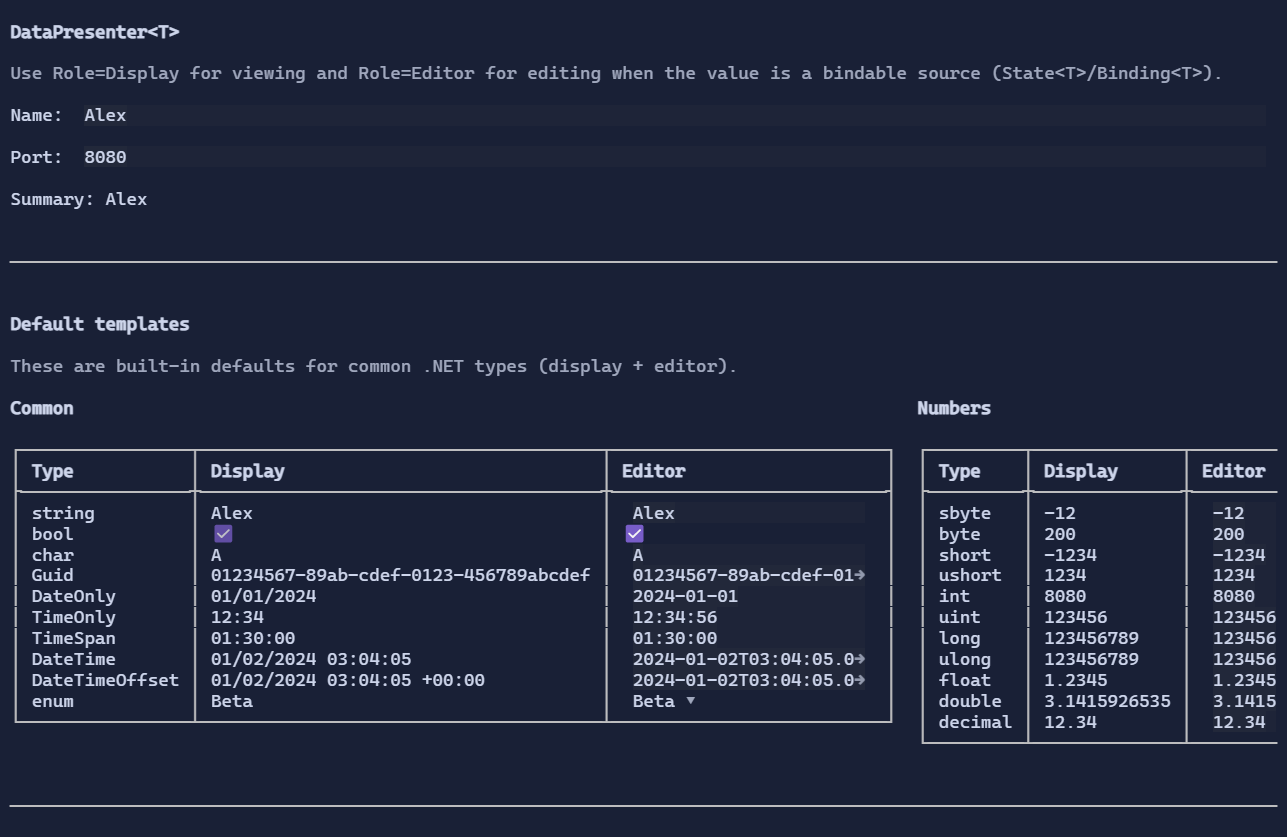
DataPresenter<T> is the "content presenter" for data values: it hosts a single value and renders it using a resolved template.
using XenoAtom.Terminal.UI.Templating;

var name = new State<string?>("Alex");

new VStack(
        name.PresentAs(DataTemplateRole.Display),
        name.PresentAs(DataTemplateRole.Editor))
    .Spacing(1);
Editor templates are intended for bindable sources (such as State<T> or Binding<T>), so that the editor can update the source.
Built-in default templates
DataTemplates.Default includes built-in templates for common .NET types.
Display templates render a value in a TextBlock (culture-aware when possible).
Editor templates render an editor that can update a bindable value (for example, State<T> or Binding<T>).
The default registry currently includes:
string/string?(TextBox editor)bool(Switch editor; display istrue/falselowercase)char(TextBox editor)- Numeric primitives:
sbyte,byte,short,ushort,int,uint,long,ulong,float,double,decimal(NumberBox editor) Guid(TextBox editor, parses standard GUID formats)DateOnly(TextBox editor,yyyy-MM-dd)TimeOnly(TextBox editor,HH:mm:ss/HH:mm)TimeSpan(TextBox editor,c)DateTime/DateTimeOffset(TextBox editor, round-tripO)
Enums
By default, enums have a display template (via ToString()), and the editor template may fall back to a text editor.
For a better UX, register a specific enum type as a dropdown editor (powered by EnumSelect<TEnum>):
using XenoAtom.Terminal.UI.Templating;

var templates = DataTemplates.Default.Derive(b => b.RegisterEnum<MyEnum>());

var ui = new VStack(
        new State<MyEnum>(MyEnum.Second).PresentAs(DataTemplateRole.Editor))
    .Style(templates);
You can also use the control directly without registering a template:
var mode = new State<MyEnum>(MyEnum.Second);

var ui = new EnumSelect<MyEnum>()
    .Value(mode);
Per-control templates
Item controls expose template slots to override the environment:
Select<T>.ItemTemplateListBox<T>.ItemTemplateOptionList<T>.ItemTemplateSelectionList<T>.ItemTemplate
Example:
using XenoAtom.Terminal.UI.Templating;

new Select<string>()
    .Items(["First", "Second", "Third"])
    .ItemTemplate(new DataTemplate<string>(
        Display: static (DataTemplateValue<string> value, in DataTemplateContext _) =>
            new HStack(Symbols.ArrowRight, new TextBlock(() => value.GetValue())).Spacing(1),
        Editor: null));
Notes on performance and recycling
Controls may reuse visuals when items scroll in/out of view:
TryUpdateallows a visual subtree to be reused for a different value.Releaseallows cleanup when a visual leaves the pool permanently.
For best results, templates should prefer updating bindable properties on an existing subtree rather than capturing item values in dynamic updates that are registered once and never cleared.