Dialog
Dialog is a movable, resizable window-like overlay used in fullscreen apps.
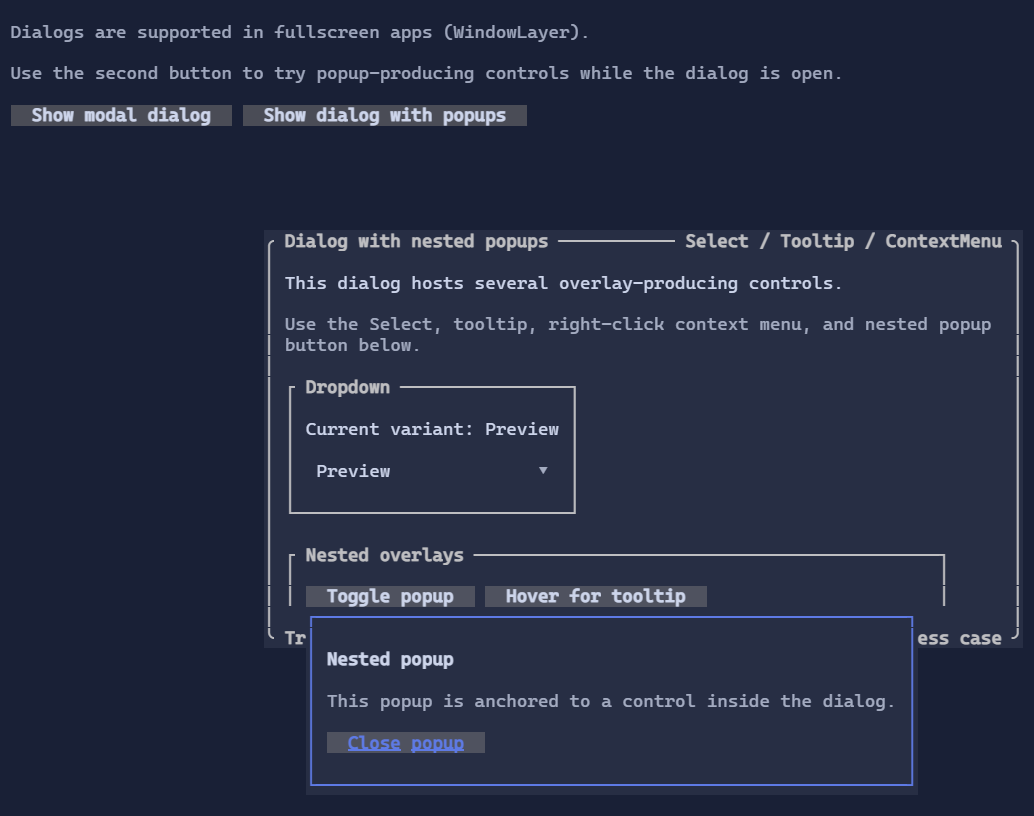
Usage
Dialogs are displayed in fullscreen apps and typically:
- take focus when shown
- restore the previously focused control when closed
- can be modal or non-modal depending on configuration
- can be moved by dragging the top border row
- highlights the top border row on hover so the move affordance is visible
- can be resized from the left, right, bottom, and bottom-right handles
- can be closed via an action (e.g. Close button)
Features
- Resize handles are enabled by default via
IsResizable. - Moving is enabled by default via
IsDraggable. DragHandleHeightexpands the draggable area while keeping the visible move-bar highlight on the top border row.- Minimum interactive size uses the inherited
MinWidthandMinHeightproperties. TopRightText,BottomLeftText, andBottomRightTextlet you decorate the dialog border the same wayGroupdoes.DialogStylelets you override border glyphs, surface/border styles, label cutout styling, and the hover styling used for resize handles and the move bar.- Top and bottom hover affordances respect border-label cutouts so the highlight does not paint over those visuals.
- Focus restoration is automatic, so showing a dialog does not require manual save/restore focus code in callers.
var dialog = new Dialog()
    .Title("Settings")
    .TopRightText("Resizable")
    .BottomLeftText("Min 40x10")
    .BottomRightText("Drag edge")
    .MinWidth(40)
    .MinHeight(10)
    .Content("Dialog body")
    .Style(DialogStyle.Rounded with
    {
        ResizeHandleHoverStyle = Style.None.WithBackground(Colors.DeepSkyBlue.WithAlpha(0x40)),
    });
Defaults
- Default alignment:
HorizontalAlignment = Align.Stretch,VerticalAlignment = Align.Stretch - Default resize behavior:
IsResizable = true
See also: