MarkdownControl
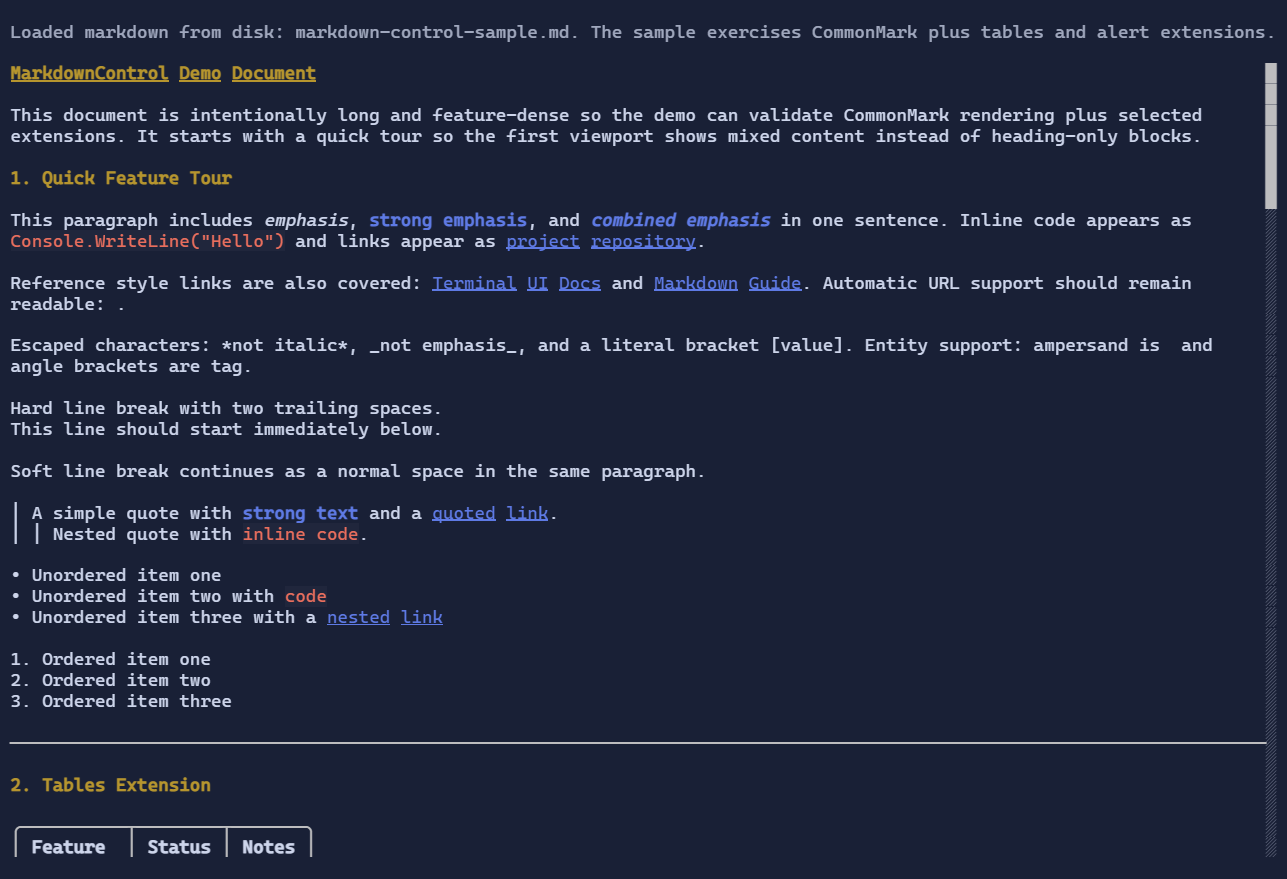
MarkdownControl renders markdown using Markdig and displays the result through DocumentFlow.
It lives in the extension package:
dotnet add package XenoAtom.Terminal.UI.Extensions.Markdown
Basic usage
using XenoAtom.Terminal.UI.Controls;
using XenoAtom.Terminal.UI.Extensions.Markdown;

var markdown = """
# Title

Paragraph with **strong** text and a [link](https://example.com).
""";

var control = new MarkdownControl(markdown);
MarkdownControl disables DocumentFlow follow-tail by default so documents open from the top.
Pipeline and rendering options
MarkdownControl uses a default pipeline supporting CommonMark plus tables and alert blocks.
You can provide your own pipeline and rendering options:
using Markdig;
using XenoAtom.Terminal.UI.Extensions.Markdown;

var pipeline = new MarkdownPipelineBuilder()
    .Configure("common+pipetables+alerts+tasklists")
    .Build();

var control = new MarkdownControl(markdown)
{
    Pipeline = pipeline,
    BaseUri = new Uri("https://xenoatom.github.io/terminal/docs/"),
    Options = MarkdownRenderOptions.Default with
    {
        WrapCodeBlocks = false,
        MaxCodeBlockHeight = 14,
        HeadingSpacingBefore = 0,
        HeadingSpacingAfter = 1,
        ParagraphSpacing = 1,
        BlockSpacing = 1,
    }
};
For Markdown documents that contain local file links, use LocalFileRootPath to resolve relative paths into valid local file:// URIs:
var control = new MarkdownControl(markdown)
{
    Options = MarkdownRenderOptions.Default with
    {
        LocalFileRootPath = Environment.CurrentDirectory,
    }
};
Absolute local paths such as C:\docs\guide.md on Windows are also normalized to file:// links automatically.
Spacing defaults are intentionally compact for terminal density:
- heading spacing before:
0 - heading spacing after:
1 - paragraph spacing:
1 - block spacing (tables/code/rules/alerts):
1
Custom fenced-code rendering
MarkdownControl exposes a code-block extension point through MarkdownRenderOptions.CodeBlockRenderer.
This lets you replace the default plain LogControl rendering for fenced or indented code blocks:
public sealed class MyCodeBlockRenderer : IMarkdownCodeBlockRenderer
{
    public Visual? CreateVisual(in MarkdownCodeBlockRenderContext context)
    {
        if (!string.Equals(context.Language, "demo", StringComparison.OrdinalIgnoreCase))
        {
            return null; // fall back to the built-in renderer
        }

        return new TextBlock("custom renderer");
    }
}

var control = new MarkdownControl(markdown)
{
    Options = MarkdownRenderOptions.Default with
    {
        CodeBlockRenderer = new MyCodeBlockRenderer(),
    },
};
Returning null delegates back to the built-in Markdown code-block visual.
TextMateSharp fenced-code highlighting
To syntax-highlight fenced code blocks with bundled TextMate grammars and themes, install the companion package:
dotnet add package XenoAtom.Terminal.UI.Extensions.CodeEditor.TextMateSharp
Then configure the Markdown renderer:
using XenoAtom.Terminal.UI.Extensions.CodeEditor.TextMateSharp;

var control = new MarkdownControl(markdown)
{
    Options = MarkdownRenderOptions.Default with
    {
        CodeBlockRenderer = new TextMateMarkdownCodeBlockRenderer(),
        WrapCodeBlocks = false,
    },
};
The TextMate-backed renderer understands fenced language identifiers such as csharp, json, or markdown, and it
automatically selects bundled light or dark TextMate themes to match the active terminal UI theme.
Styling markdown
Use RenderStyle for role-based customization (headings, links, emphasis, alerts):
using XenoAtom.Terminal.UI.Extensions.Markdown.Styling;

var control = new MarkdownControl(markdown)
{
    RenderStyle = MarkdownStyle.Default with
    {
        LinkStyle = Style.None | TextStyle.Bold | TextStyle.Underline,
        Heading1Style = Style.None | TextStyle.Bold | TextStyle.Underline
    }
};
By default, MarkdownControl applies a theme-aware style profile:
- headings use a warning/gold-like tone for better visual hierarchy
- headings use bright yellow for better hierarchy
- strong text uses the theme accent color
- inline code uses bright red text with an adaptive tinted background
- alert blocks (
NOTE/TIP/IMPORTANT/WARNING/CAUTION) map to semantic theme tones (primary/success/accent/warning/error)