MarkdownMarkupConverter
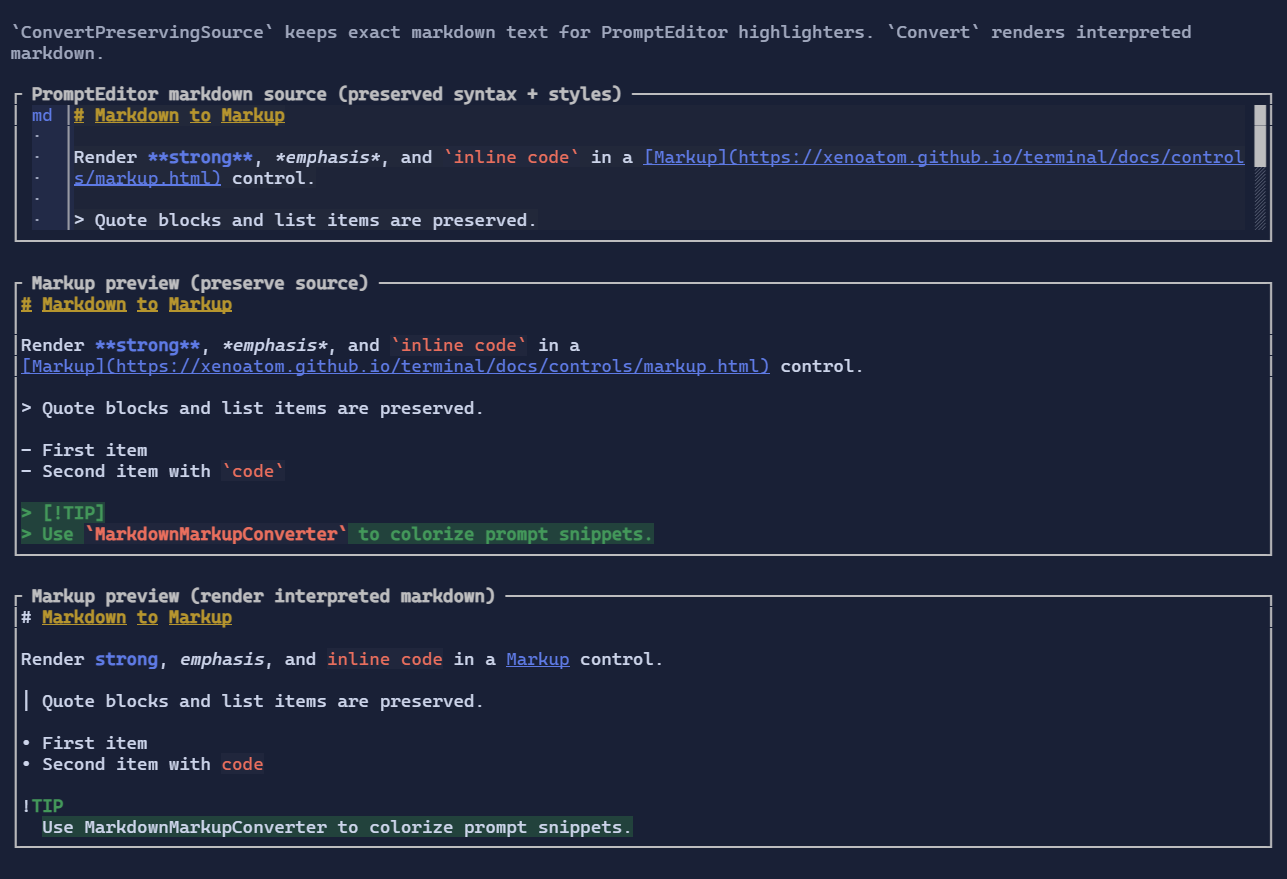
MarkdownMarkupConverter provides two modes:
- Render mode: converts interpreted markdown into ANSI markup (similar visual output to
MarkdownControl) - Preserve-source mode: keeps the exact original markdown text and applies styles via source spans
This makes it suitable for both Markup previews and PromptEditor syntax highlighting.
It lives in the extension package:
dotnet add package XenoAtom.Terminal.UI.Extensions.Markdown
Basic usage
using XenoAtom.Terminal.UI.Controls;
using XenoAtom.Terminal.UI.Extensions.Markdown;

var converter = new MarkdownMarkupConverter();
var markupText = converter.Convert("**bold** and `code`");

var preview = new Markup(markupText).Wrap(true);
Preserve-source mode (PromptEditor-ready)
Use Highlight(...) to get StyledRun spans over the original markdown string.
Use ConvertPreservingSource(...) to generate ANSI markup that keeps the exact same markdown characters (#, **, backticks, spacing, etc.).
var converter = new MarkdownMarkupConverter();
var sourceMarkup = converter.ConvertPreservingSource(markdownText);
var sourceRuns = converter.Highlight(markdownText);
Highlight(...) is designed for controls such as PromptEditor, where text must stay unchanged while styles update.
Theme-aware defaults
The converter uses the same role-based defaults as MarkdownControl:
- headings use bright yellow
- strong text uses accent/primary theme tones
- inline code uses bright red with themed background tint
- links use accent/primary underline styling
Set Theme to align output with your app theme:
var converter = new MarkdownMarkupConverter
{
    Theme = Theme.FromScheme(ColorScheme.ElderberryDarkSoft),
};
Custom pipeline and options
You can provide a custom Markdig pipeline and rendering options:
var converter = new MarkdownMarkupConverter
{
    Pipeline = new MarkdownPipelineBuilder().Configure("common+tasklists").Build(),
    RenderOptions = MarkdownRenderOptions.Default with
    {
        RenderHtmlInlinesAsText = true,
        RenderImagesAsLinks = true,
    },
};
For preserve-source highlighting, you can also set SourcePipeline.
If you provide your own source pipeline, call UsePreciseSourceLocation() on the builder so inline spans are precise.
Allocation behavior
MarkdownMarkupConverter reuses an internal StringBuilder when you call Convert(string), so repeated conversions avoid re-allocating the conversion buffer.
It also supports reusable destination paths:
Convert(string?, StringBuilder)ConvertPreservingSource(string?, StringBuilder)Highlight(string?, List<StyledRun>)