PromptEditor
PromptEditor is a prompt-style text editor built on top of the TextEditorBase / TextEditorCore infrastructure.
It is designed for REPLs and terminal prompts where you want:
- a prompt prefix (markup),
- single-line or multi-line editing,
- completion (ghost + popup/cycling),
- prompt-oriented accept/cancel actions,
- optional syntax highlighting.
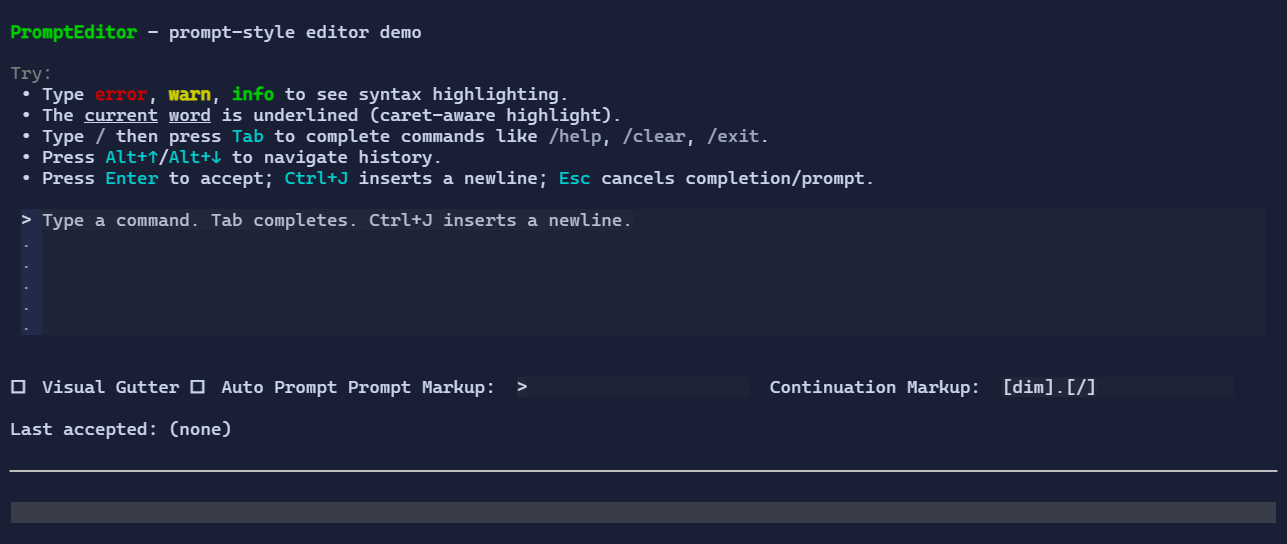
Basic usage
var command = new State<string?>(string.Empty);

var editor = new PromptEditor()
    .Text(command)
    .PromptMarkup("[primary]demo[/] [muted]>[/] ")
    .Placeholder("Type a command… (Tab completes)");
Enter vs Ctrl+J (new line)
By default:
EnteracceptsCtrl+Jinserts a newline (\n)
You can swap these behaviors:
new PromptEditor()
    .EnterMode(PromptEditorEnterMode.EnterInsertsNewLine);
If you also surface prompt commands through a CommandBar, you can configure their labels, descriptions, and gestures at
construction time so the hints match your chosen enter mode semantics:
var config = PromptEditorConfig.Default with
{
    AcceptCommand = PromptEditorConfig.Default.AcceptCommand with
    {
        LabelMarkup = "Submit",
        DescriptionMarkup = "Submit the current prompt text with Ctrl+J.",
        Gesture = new KeyGesture(TerminalChar.CtrlJ, TerminalModifiers.Ctrl),
    },
    InsertNewLineCommand = PromptEditorConfig.Default.InsertNewLineCommand with
    {
        LabelMarkup = "New line",
        DescriptionMarkup = "Insert a newline with Enter.",
        Gesture = new KeyGesture(TerminalKey.Enter),
    },
};

new PromptEditor(config)
    .EnterMode(PromptEditorEnterMode.EnterInsertsNewLine);
PromptEditorConfig.Default preserves the existing command labels and shortcuts.
Single-line mode
PromptEditor defaults to multi-line editing. If you want prompt-style behavior with a single editable line, switch the
editor to SingleLine mode:
new PromptEditor()
    .LineMode(PromptEditorLineMode.SingleLine);
In single-line mode, attempted line breaks are discarded:
Enter/Ctrl+Jstill followEnterMode, but the action that would insert a newline becomes a no-op- pasted line breaks are removed
- text updates containing
\ror\nare normalized back to a single line - the default measured height becomes one row instead of the multi-line default
The PromptEditor.InsertNewLine command is hidden when LineMode is SingleLine.
Syntax highlighting
PromptEditor supports lightweight, pluggable syntax highlighting via a delegate that produces style runs:
new PromptEditor()
    .Highlighter((in PromptEditorHighlightRequest request, List<StyledRun> runs) =>
    {
        // Use request.Snapshot and add StyledRun(start, length, style) entries.
        // request.CaretIndex / request.Selection* are provided for caret-aware highlighting.
    });
Completion
Completion is pluggable via CompletionHandler:
new PromptEditor()
    .CompletionPresentation(PromptEditorCompletionPresentation.PopupList)
    .CompletionHandler(request =>
    {
        // Compute candidates for request.Snapshot at request.CaretIndex...
        return new PromptEditorCompletion(
            Handled: true,
            Candidates: new[] { "help", "clear", "exit" },
            ReplaceStart: 0,
            ReplaceLength: request.CaretIndex,
            GhostText: "elp");
    });
Default behavior:
Tabrequests completion (unlessAcceptTab=true).- In
PopupListmode, a single candidate is applied immediately; the popup is only used when there are multiple choices. Esccancels completion (or cancels the prompt if no completion UI is active).
If you want to reuse Esc for another command when completion is inactive, switch the editor to completion-only escape
handling:
new PromptEditor()
    .EscapeBehavior(PromptEditorEscapeBehavior.CancelCompletionOnly);
With that mode, Esc still dismisses active completion UI, but otherwise falls through to other shortcut bindings.
Prompt prefix
PromptEditor renders the prompt prefix in a dedicated left column:
PromptMarkupis rendered on the first visual rowContinuationPromptMarkupis rendered for continuation rows
If ContinuationPromptMarkup is empty, the control keeps the column width but does not draw text.
Prompt as a visual
For richer prompts (icons, spinners, widgets…), you can provide a visual prompt:
new PromptEditor()
    .Prompt(new HStack(
        new Spinner().MinWidth(1),
        new Markup("[primary]demo[/] [muted]>[/] ")));
When Prompt is set, it takes precedence over PromptMarkup on the first visual row. Continuation rows still use
ContinuationPromptMarkup (or indentation if empty).
Commands (CommandBar)
PromptEditor registers prompt-specific commands so a CommandBar can surface shortcuts:
PromptEditor.AcceptPromptEditor.CancelPromptEditor.InsertNewLinePromptEditor.CompletePromptEditor.HistoryPrevious/PromptEditor.HistoryNext
Use PromptEditorConfig when you need those command hints to reflect a custom enter/new-line workflow.
It also inherits TextEditor.* commands from TextEditorBase (undo/redo/copy/paste/select-all, etc.).
Defaults
- Default alignment:
HorizontalAlignment = Align.Stretch,VerticalAlignment = Align.Stretch