TextBox
TextBox is a single-line text editor.
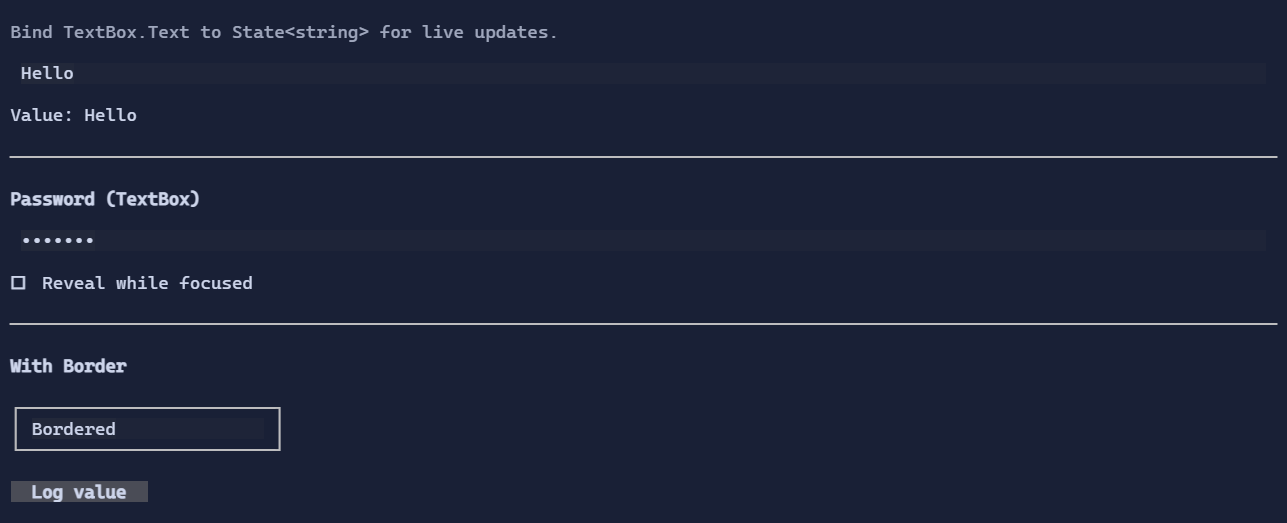
Basic usage
var name = new State<string>("Alex");
new TextBox().Text(name);
You can also pass initial text:
new TextBox("Hello");
Editing features
- cursor navigation
- selection (keyboard and mouse)
- clipboard shortcuts (Ctrl+C/X/V) when enabled by the control mode / clipboard settings
- placeholder text stays visible while the editor is empty, even when focused, and renders dimmed
- overflow indicators when content is wider than the viewport
Undo / redo
TextBox supports undo/redo:
Ctrl+Z: undoCtrl+R: redo
See Undo/Redo.
Password mode
TextBox can mask its text to behave like a password input:
new TextBox("hunter2")
    .IsPassword(true)
    .ClipboardMode(TextBoxClipboardMode.Disabled)
    .PasswordRevealMode(PasswordRevealMode.WhileFocused);
Masking uses the glyph configured by TextBoxStyle.PasswordMaskGlyph.
Overflow indicators
When content is wider than the viewport, the TextBox can show start/end indicators configured by TextBoxStyle (arrows/ellipsis variants).
Key properties
Text: the current text (bindable, supportsState<string>two-way binding via fluent API).TextAlignment: left/center/right alignment inside the editor.IsPassword: enables masking.PasswordRevealMode: controls when the real text is revealed.ClipboardMode: enables/disables copy/cut/paste behaviors (useful for secrets).
In password mode, copy/cut is typically disabled so the masked value doesn’t leak via clipboard.
Defaults
- Default alignment:
HorizontalAlignment = Align.Start,VerticalAlignment = Align.Start
Styling
TextBox uses background on the text region while keeping borders visually compatible with the terminal background.
TextBoxStyle also supports brush-based gradients:
new TextBox("Gradient-enabled")
    .Style(TextBoxStyle.Default with
    {
        BackgroundBrush = Brush.LinearGradient(
            new GradientPoint(0f, 0f),
            new GradientPoint(1f, 0f),
            [new GradientStop(0f, Color.Rgb(0x11, 0x25, 0x3D)), new GradientStop(1f, Color.Rgb(0x12, 0x20, 0x33))]),
        ForegroundBrush = Brush.LinearGradient(
            new GradientPoint(0f, 0f),
            new GradientPoint(1f, 0f),
            [new GradientStop(0f, Colors.White), new GradientStop(1f, Colors.DeepSkyBlue)]),
    });
See also: