CodeEditor
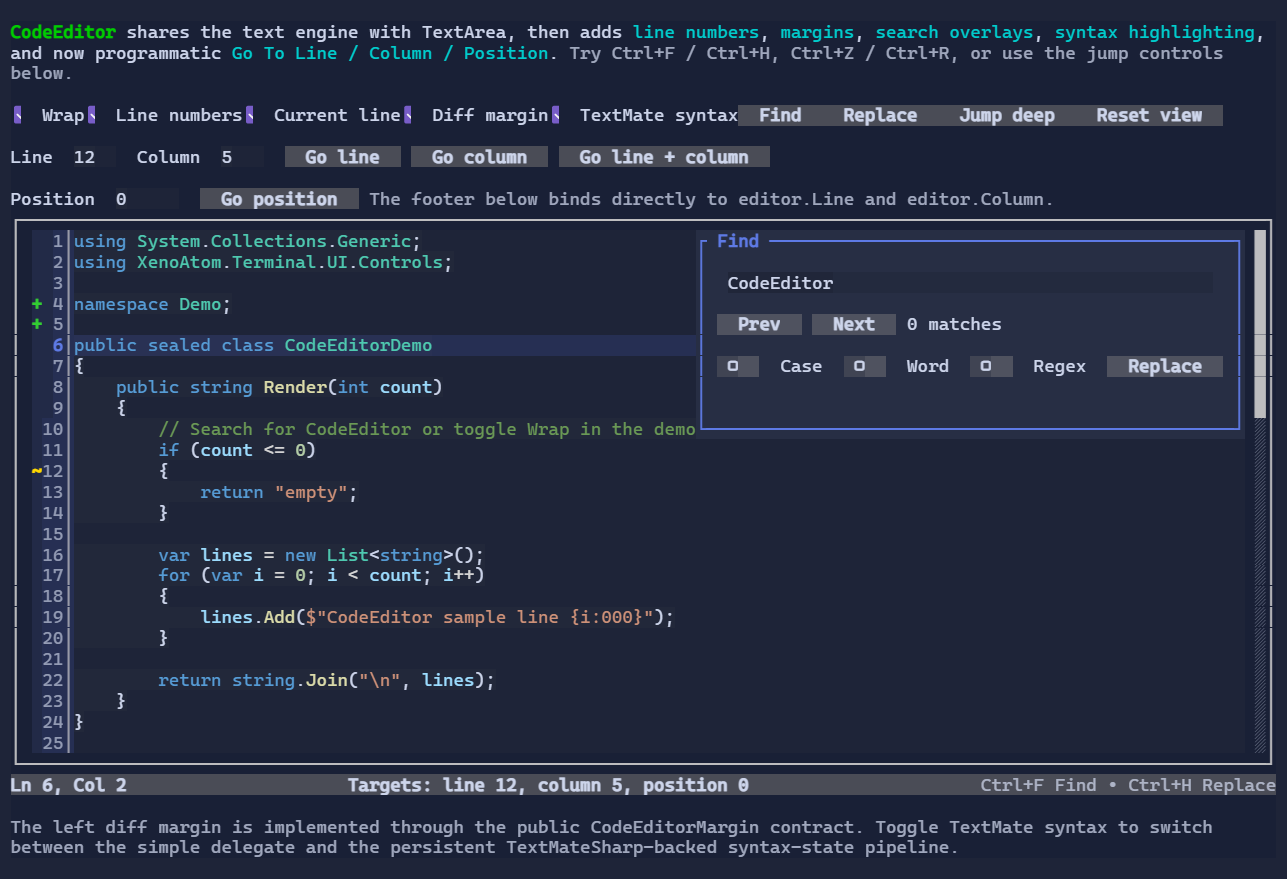
CodeEditor is a code-oriented multi-line editor built on top of the shared TextEditorBase / TextEditorCore stack.
It keeps the core text-editing behavior of TextArea-selection, clipboard, undo/redo, scrolling, and Find/Replace-then adds:
- adaptive line numbers enabled by default,
- pluggable left/right margins,
- current-line styling,
- a simple line-based highlighting delegate,
- an advanced persistent syntax-highlighting pipeline with optional async computation.
Basic usage
var editor = new CodeEditor("public sealed class Demo { }")
    .MinHeight(10)
    .MaxHeight(10);
To bind the editor text to a State<string?>:
var code = new State<string?>("return 42;");

new CodeEditor()
    .Text(code);
Built-in editing behavior
CodeEditor inherits the shared editor behavior from TextEditorBase:
- caret navigation and selection,
- clipboard shortcuts (
Ctrl+C,Ctrl+X,Ctrl+V), - undo/redo (
Ctrl+Z,Ctrl+R), - integrated Find/Replace (
Ctrl+F,Ctrl+H), - scroll integration through
IScrollable/ScrollModel.
This means CodeEditor behaves like a specialized TextArea, not a separate editing subsystem.
Go To Line / Column / Position
CodeEditor exposes programmatic navigation helpers:
editor.GoToLine(42);          // one-based line, column 1
editor.GoToColumn(8);         // one-based column on the current line
editor.GoToLine(42, 8);       // one-based line + column
editor.GoToPosition(128);     // zero-based UTF-16 document position
editor.GoToPosition(new TextPosition(128));
Line and column navigation use one-based values because they are intended to match the numbers users typically see in editor gutters and status bars. Requests are clamped to the current document bounds.
For status bars and other bindings, CodeEditor also exposes readable bindable caret-location properties:
new Footer()
    .Left(new TextBlock(() => $"Ln {editor.Line}, Col {editor.Column}"));
Line and Column are one-based and update automatically as the caret moves.
Line numbers
Line numbers are enabled by default:
new CodeEditor(text)
    .ShowLineNumbers(true)
    .MinLineNumberDigits(2);
The default gutter is adaptive:
- numbers are rendered only on the first wrapped row of a logical line,
- continuation wrapped rows stay blank,
- gutter width is based on the visible line range instead of the total document size,
- width changes only when the visible digit bucket changes.
Search / Replace
Like TextArea, CodeEditor hosts the reusable SearchReplacePopup:
Ctrl+F: FindCtrl+H: Replace
You can also open the popup programmatically:
editor.OpenFind("TODO");
editor.OpenReplace("var");
Search matches are rendered as overlays on top of the syntax-highlighted text.
Simple syntax highlighting
For small languages, demos, or lightweight classification, use the Highlighter delegate:
new CodeEditor(source)
    .Highlighter((in CodeEditorLineHighlightRequest request, List<StyledRun> runs) =>
    {
        var line = request.Snapshot.GetLine(request.LineIndex);
        if (line.Length >= 6)
        {
            runs.Add(new StyledRun(0, 6, Style.None.WithForeground(Colors.DeepSkyBlue)));
        }
    });
Runs are line-relative, not wrap-relative. CodeEditor intersects them with only the visible wrapped segments.
Advanced syntax highlighting
For large files or incremental tokenization, provide a CodeEditorSyntaxHighlighter:
public sealed class DemoSyntaxHighlighter : CodeEditorSyntaxHighlighter
{
    public override CodeEditorSyntaxState Build(in CodeEditorSyntaxBuildContext context)
        => new DemoState(context.Snapshot.Version);

    public override CodeEditorSyntaxState Update(CodeEditorSyntaxState previousState, in CodeEditorSyntaxUpdateContext context)
        => new DemoState(context.Snapshot.Version);

    public override void GetLineRuns(CodeEditorSyntaxState state, in CodeEditorLineSyntaxRequest request, List<StyledRun> runs)
    {
        // Return StyledRun values relative to request.LineStart/request.LineLength.
    }
}

new CodeEditor(source)
    .SyntaxHighlighter(new DemoSyntaxHighlighter());
Key points:
- syntax state is associated with a snapshot version,
- viewport width changes rewrap the editor without rebuilding syntax state,
- pure scrolling only requests visible logical lines,
- stale async results are discarded.
If your highlighter can work off the UI thread, also implement IAsyncCodeEditorSyntaxHighlighter.
TextMateSharp integration
For full grammar-based highlighting, use the companion package:
dotnet add package XenoAtom.Terminal.UI.Extensions.CodeEditor.TextMateSharp
Then attach the bundled TextMateSharp-backed highlighter:
using XenoAtom.Terminal.UI.Extensions.CodeEditor.TextMateSharp;

var editor = new CodeEditor(source)
{
    SyntaxHighlighter = new TextMateCodeEditorSyntaxHighlighter(
        new TextMateCodeEditorOptions
        {
            LanguageId = "csharp",
        }),
};
You can also resolve grammars from a file name or extension:
var highlighter = new TextMateCodeEditorSyntaxHighlighter(
    new TextMateCodeEditorOptions
    {
        FileName = "program.cs",
    });
The TextMateSharp integration keeps incremental per-line tokenizer state so edits only need to recompute the affected suffix of the document, while rendering colors are resolved from bundled light and dark TextMate themes according to the active terminal UI theme.
Pluggable margins
Margins are non-visual extension points that render beside the text surface:
var diffMargin = CodeEditor.CreateDiffIndicatorMargin(
    lineIndex => lineIndex switch
    {
        3 => new Rune('+'),
        4 => new Rune('+'),
        10 => new Rune('~'),
        _ => null,
    },
    lineIndex => lineIndex < 10
        ? Style.None.WithForeground(Colors.LimeGreen) | TextStyle.Bold
        : Style.None.WithForeground(Colors.Gold) | TextStyle.Bold);

var editor = new CodeEditor(source);
editor.LeftMargins.Insert(0, diffMargin);
Margins receive:
- the visible wrapped-row mapping,
- the owning logical line,
- first-row-of-line information,
- theme/style access,
- pointer-routing support.
This allows features such as line numbers, diff markers, diagnostics, breakpoints, or custom annotations without making margins into Visuals.
Styling
Use CodeEditorStyle to customize the editor surface, gutter, current-line highlight, and search overlays:
new CodeEditor(source)
    .Style(CodeEditorStyle.Default with
    {
        CurrentLineBackground = Colors.DeepSkyBlue.WithAlpha(0x22),
        SearchMatchBackground = Colors.Gold.WithAlpha(0x30),
        ActiveSearchMatchBackground = Colors.Orange,
        ShowMarginSeparators = true,
    });
Scroll integration
CodeEditor implements IScrollable, so it integrates naturally with ScrollViewer:
new ScrollViewer(new CodeEditor(longSource).MinHeight(12).MaxHeight(12));
The gutter does not horizontally scroll with the text surface.